JPA
你可以将 JPA 实体用作流程变量,从而实现:
- 根据可在用户任务(userTask)表单中填写、或在服务任务(serviceTask)中生成的流程变量,更新已有的 JPA 实体。
- 复用已有的领域模型,而不必编写显式的服务来获取实体并更新其值。
- 根据已有实体的属性做出决策(网关)。
- …
要求
只支持符合以下条件的实体:
- 实体应使用 JPA 注解配置,我们同时支持字段访问和属性访问。也可以使用映射超类(mapped super class)。
- 实体应具有用 @Id 注解的主键,不支持复合主键(@EmbeddedId 和 @IdClass)。Id 字段/属性可以是 JPA 规范支持的任何类型:基本类型及其包装类(boolean 除外)、String、BigInteger、BigDecimal、java.util.Date 和 java.sql.Date。
配置
要使用 JPA 实体,引擎必须持有一个 EntityManagerFactory 的引用。可以通过配置引用来实现,也可以提供 persistence-unit 的名称。用作变量的 JPA 实体会被自动检测并相应处理。
下面的示例配置使用了 jpaPersistenceUnitName:
<bean id="processEngineConfiguration"
  class="org.flowable.engine.impl.cfg.StandaloneInMemProcessEngineConfiguration">

<!-- Database configurations -->
<property name="databaseSchemaUpdate" value="true" />
<property name="jdbcUrl" value="jdbc:h2:mem:JpaVariableTest;DB_CLOSE_DELAY=1000" />

<property name="jpaPersistenceUnitName" value="flowable-jpa-pu" />
<property name="jpaHandleTransaction" value="true" />
<property name="jpaCloseEntityManager" value="true" />

<!-- job executor configurations -->
<property name="asyncExecutorActivate" value="false" />

<!-- mail server configurations -->
<property name="mailServerPort" value="5025" />
</bean>
下一个示例配置提供了一个我们自己定义的 EntityManagerFactory(本例中是一个 open-jpa 实体管理器)。请注意,该片段只包含与示例相关的 bean,其余的已省略。带有 open-jpa 实体管理器的完整可运行示例可以在 flowable-spring-examples(/flowable-spring/src/test/java/org/flowable/spring/test/jpa/JPASpringTest.java)中找到。
<bean id="entityManagerFactory" class="org.springframework.orm.jpa.LocalContainerEntityManagerFactoryBean">
  <property name="persistenceUnitManager" ref="pum"/>
  <property name="jpaVendorAdapter">
    <bean class="org.springframework.orm.jpa.vendor.OpenJpaVendorAdapter">
      <property name="databasePlatform" value="org.apache.openjpa.jdbc.sql.H2Dictionary" />
    </bean>
  </property>
</bean>

<bean id="processEngineConfiguration" class="org.flowable.spring.SpringProcessEngineConfiguration">
  <property name="dataSource" ref="dataSource" />
  <property name="transactionManager" ref="transactionManager" />
  <property name="databaseSchemaUpdate" value="true" />
  <property name="jpaEntityManagerFactory" ref="entityManagerFactory" />
  <property name="jpaHandleTransaction" value="true" />
  <property name="jpaCloseEntityManager" value="true" />
  <property name="asyncExecutorActivate" value="false" />
</bean>
以编程方式构建引擎时也可以进行相同的配置,例如:
ProcessEngine processEngine = ProcessEngineConfiguration
    .createProcessEngineConfigurationFromResourceDefault()
    .setJpaPersistenceUnitName("flowable-pu")
    .buildProcessEngine();
配置属性:
- jpaPersistenceUnitName:要使用的 persistence-unit 名称。(请确保该 persistence-unit 在 classpath 上可用。根据规范,默认位置为 /META-INF/persistence.xml)。jpaEntityManagerFactory 与 jpaPersistenceUnitName 二选一。
- jpaEntityManagerFactory:指向实现 jakarta.persistence.EntityManagerFactory 的 bean 的引用,该工厂将用于加载实体并刷新更新。jpaEntityManagerFactory 与 jpaPersistenceUnitName 二选一。
- jpaHandleTransaction:指示引擎是否应在使用的 EntityManager 实例上开启并提交/回滚事务的标志。当使用 Java Transaction API (JTA) 时设置为 false。
- jpaCloseEntityManager:指示引擎是否应关闭从 EntityManagerFactory 获取的 EntityManager 实例的标志。当 EntityManager 由容器管理时(例如使用作用域不限于单个事务的 Extended Persistence Context 时)设置为 false。
用法
简单示例
使用 JPA 变量的示例可以在 Flowable 源码中的 JPAVariableTest 里找到。我们将逐步讲解 JPAVariableTest.testUpdateJPAEntityValues。
首先,我们为 persistence-unit 创建一个 EntityManagerFactory,该工厂基于 META-INF/persistence.xml。其中包含应纳入 persistence unit 的类以及一些与厂商相关的配置。
测试中使用了一个简单实体,具有 id 和 String 类型的 value 属性,该属性也会被持久化。运行测试之前,我们创建一个实体并将其保存。
@Entity(name = "JPA_ENTITY_FIELD")
public class FieldAccessJPAEntity {

  @Id
  @Column(name = "ID_")
  private Long id;

  private String value;

  public FieldAccessJPAEntity() {
    // Empty constructor needed for JPA
  }

  public Long getId() {
    return id;
  }

  public void setId(Long id) {
    this.id = id;
  }

  public String getValue() {
    return value;
  }

  public void setValue(String value) {
    this.value = value;
  }
}
我们启动一个新的流程实例,并把该实体作为变量添加。与其他变量一样,它们存储在引擎的持久化存储中。下次请求该变量时,将根据存储的类和 Id 从 EntityManager 中加载。
Map<String, Object> variables = new HashMap<String, Object>();
variables.put("entityToUpdate", entityToUpdate);

ProcessInstance processInstance = runtimeService.startProcessInstanceByKey(
    "UpdateJPAValuesProcess", variables);
流程定义中的第一个节点包含一个 serviceTask,它将调用 entityToUpdate 上的 setValue 方法;entityToUpdate 解析为我们在启动流程实例时设置的 JPA 变量,并将从与当前引擎上下文关联的 EntityManager 中加载。
<serviceTask id='theTask' name='updateJPAEntityTask'
  flowable:expression="${entityToUpdate.setValue('updatedValue')}" />
服务任务完成后,流程实例在流程定义中定义的 userTask 处等待,这使我们能够检查该流程实例。此时,EntityManager 已被 flush,对实体的修改已推送到数据库。当我们获取变量 entityToUpdate 的值时,它会被再次加载,我们得到的实体的 value 属性已被设置为 updatedValue。
// Servicetask in process 'UpdateJPAValuesProcess' should have set value on entityToUpdate.
Object updatedEntity = runtimeService.getVariable(processInstance.getId(), "entityToUpdate");
assertTrue(updatedEntity instanceof FieldAccessJPAEntity);
assertEquals("updatedValue", ((FieldAccessJPAEntity)updatedEntity).getValue());
查询 JPA 流程变量
你可以查询以某个 JPA 实体作为变量值的 ProcessInstance 和 Execution。请注意,对于 ProcessInstanceQuery 和 ExecutionQuery 上的 JPA 实体,仅支持 variableValueEquals(name, entity)。当传入 JPA 实体作为值时,variableValueNotEquals、variableValueGreaterThan、variableValueGreaterThanOrEqual、variableValueLessThan 和 variableValueLessThanOrEqual 方法不受支持,并且会抛出 FlowableException。
 ProcessInstance result = runtimeService.createProcessInstanceQuery()
    .variableValueEquals("entityToQuery", entityToQuery).singleResult();
使用 Spring Bean 和 JPA 的高级示例
一个更高级的示例 JPASpringTest 可以在 flowable-spring-examples 中找到。它描述了以下简单用例:
- 已经存在一个使用 JPA 实体的 Spring Bean,可用于存储贷款申请(Loan Request)。
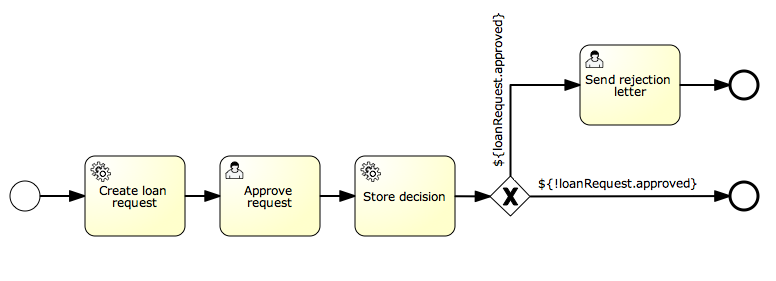
- 使用 Flowable,我们可以使用通过该已有 bean 获取的实体,并将其作为流程中的变量使用。该流程按以下步骤定义:
-   Service task that creates a new LoanRequest, using the existing LoanRequestBean using variables received when starting the process (e.g. could come from a start form). The created entity is stored as a variable, using flowable:resultVariable which stores the expression result as a variable.

-   UserTask that allows a manager to review the request and approve/disapprove, which is stored as a boolean variable approvedByManager

-   ServiceTask that updates the loan request entity so the entity is in sync with the process.

-   Depending on the value of the entity property approved, an exclusive gateway is used to make a decision about what path to take next: When the request is approved, process ends, otherwise, an extra task will become available (Send rejection letter), so the customer can be notified manually by a rejection letter.
请注意,该流程不包含任何表单,因为它仅用于单元测试。
<?xml version="1.0" encoding="UTF-8"?>
<definitions id="taskAssigneeExample"
  xmlns="http://www.omg.org/spec/BPMN/20100524/MODEL"
  xmlns:xsi="http://www.w3.org/2001/XMLSchema-instance"
  xmlns:flowable="http://flowable.org/bpmn"
  targetNamespace="org.flowable.examples">

  <process id="LoanRequestProcess" name="Process creating and handling loan request">
    <startEvent id='theStart' />
    <sequenceFlow id='flow1' sourceRef='theStart' targetRef='createLoanRequest' />

    <serviceTask id='createLoanRequest' name='Create loan request'
      flowable:expression="${loanRequestBean.newLoanRequest(customerName, amount)}"
      flowable:resultVariable="loanRequest"/>
    <sequenceFlow id='flow2' sourceRef='createLoanRequest' targetRef='approveTask' />

    <userTask id="approveTask" name="Approve request" />
    <sequenceFlow id='flow3' sourceRef='approveTask' targetRef='approveOrDissaprove' />

    <serviceTask id='approveOrDissaprove' name='Store decision'
      flowable:expression="${loanRequest.setApproved(approvedByManager)}" />
    <sequenceFlow id='flow4' sourceRef='approveOrDissaprove' targetRef='exclusiveGw' />

    <exclusiveGateway id="exclusiveGw" name="Exclusive Gateway approval" />
    <sequenceFlow id="endFlow1" sourceRef="exclusiveGw" targetRef="theEnd">
      <conditionExpression xsi:type="tFormalExpression">${loanRequest.approved}</conditionExpression>
    </sequenceFlow>
    <sequenceFlow id="endFlow2" sourceRef="exclusiveGw" targetRef="sendRejectionLetter">
      <conditionExpression xsi:type="tFormalExpression">${!loanRequest.approved}</conditionExpression>
    </sequenceFlow>

    <userTask id="sendRejectionLetter" name="Send rejection letter" />
    <sequenceFlow id='flow5' sourceRef='sendRejectionLetter' targetRef='theOtherEnd' />

    <endEvent id='theEnd' />
    <endEvent id='theOtherEnd' />
  </process>

</definitions>
尽管上面的示例相当简单,但它展示了将 JPA 与 Spring 以及参数化方法表达式结合使用的强大能力。该流程完全不需要自定义 Java 代码(Spring Bean 除外),并能显著加快开发速度。